


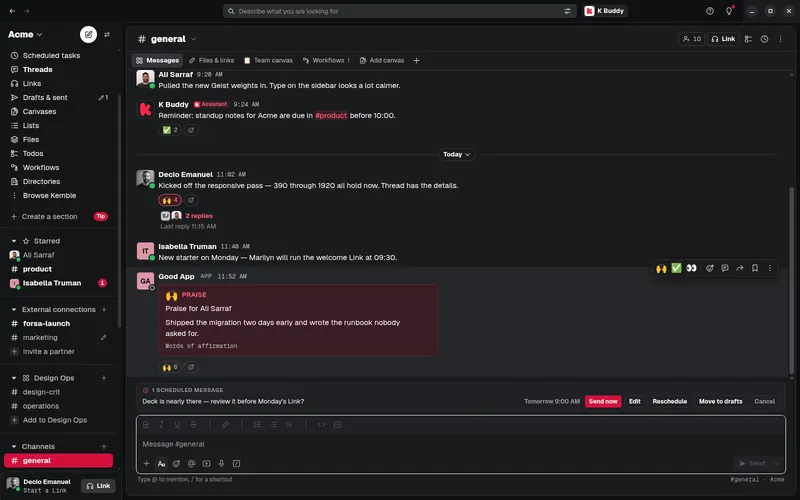
Kemble, on every
screen you own.
One account, several organizations, every device. Notifications follow you, not the tab.
Which Mac do you have?
Not sure? Open the Apple menu, then About This Mac: it shows a Chip on Apple silicon and a Processor on an Intel Mac.
Version 0.2.10, released 2 November 2026.
Already installed? Open Kemble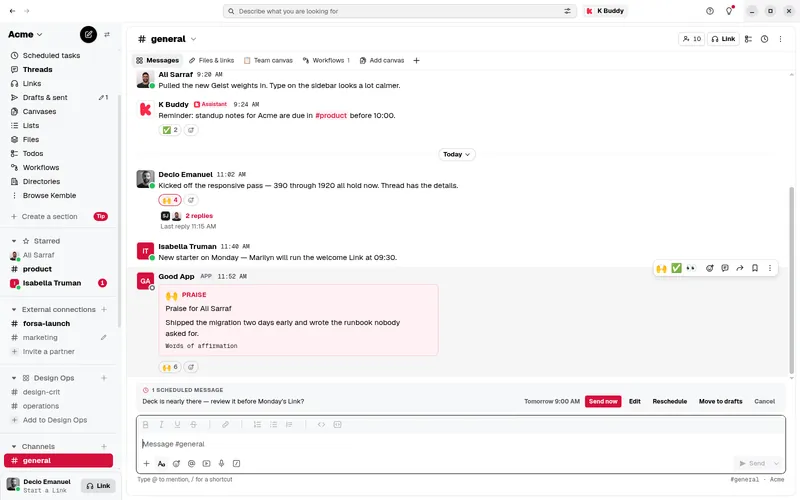

Every download
Version 0.2.10 for every system and processor. Not sure which file? The one marked Recommended is the one to choose.
Windows
Windows 10 or 11, on x64 or Arm.
- Installer x64116 MB
Recommended.Installs Kemble and keeps it up to date.
- Installer Arm110 MB
Installs Kemble and keeps it up to date.
- Portable x64116 MB
Runs without installing; updates are downloaded by hand.
macOS
macOS 12 Monterey or later, on Apple silicon or Intel.
- .zip Apple silicon121 MB
Recommended.Open it, then drag Kemble to Applications.
- .zip Intel126 MB
Recommended.Open it, then drag Kemble to Applications.
Linux
A 64-bit distribution with glibc 2.31 or later (Ubuntu 20.04, Debian 11 or newer), on X11 or Wayland, x64 or Arm.
- .deb x6494.8 MB
Recommended.Debian, Ubuntu and their family. Best on Ubuntu 24.04 and later.
- AppImage x64120 MB
Any distribution: make it executable and run it.
- AppImage Arm121 MB
Any distribution: make it executable and run it.
- .deb Arm90.2 MB
Debian, Ubuntu and their family. Best on Ubuntu 24.04 and later.
- .tar.gz x64114 MB
Unpack anywhere and run kemble.
- .tar.gz Arm115 MB
Unpack anywhere and run kemble.
On Ubuntu 24.04 and later, use the .deb: the AppImage cannot use Chromium’s sandbox there.
Verify your download
Every file’s SHA-256 checksum is below. Work out the one of the file you downloaded and compare: if they match, the file is the one Kemble published.
- Windows
certutil -hashfile Kemble-Setup-0.2.10-x64.exe SHA256- macOS
shasum -a 256 Kemble-0.2.10-mac-arm64.zip- Linux
sha256sum Kemble-0.2.10-linux-amd64.deb
| File | Checksum |
|---|---|
| Windows Installer, ArmKemble-Setup-0.2.10-arm64.exe | SHA-2564c610113a3ee7a3a7a259aa55b6b4b6a18f2c2ef2b8d28cfbbc68f74f70a1bcd |
| Windows Installer, x64Kemble-Setup-0.2.10-x64.exe | SHA-2565ca11690700dc2e6e648ece121235a6546a9ad4fe5a70293427a551d5ec82223 |
| Windows Portable, x64Kemble-Portable-0.2.10-x64.exe | SHA-2568dd164e6736d0bad2fc9e217987c7f32df4d1e9073ac41e0c7ab001a342dba78 |
| macOS .zip, Apple siliconKemble-0.2.10-mac-arm64.zip | SHA-2568fd38c85c24cd1a2ba0178dd6a9f42dc3cb317031be3125f4a7f2fac0181feb1 |
| macOS .zip, IntelKemble-0.2.10-mac-x64.zip | SHA-256f8fede884d4ddc3b73b9cc3de1e2c48d3a34205ae80906959f641c74083977bc |
| Linux AppImage, ArmKemble-0.2.10-linux-arm64.AppImage | SHA-2563fb8de600c77e68733ff3115c0aae04c202974573c0abfc49941172f095c5498 |
| Linux .deb, ArmKemble-0.2.10-linux-arm64.deb | SHA-256daa49ceb902bac144bae3542df23bc3d803a71f36357ba7ab40a4cdb04a7f251 |
| Linux .tar.gz, ArmKemble-0.2.10-linux-arm64.tar.gz | SHA-256081d5b28acdec1743ba6e6707e65534fa6adafe2ed101f7f1c0542a7c39c5f8a |
| Linux AppImage, x64Kemble-0.2.10-linux-x86_64.AppImage | SHA-256fb877b9fef1b0672c4bfada59ddea53db67aae21ad9c379b1fd6f780fe3c246f |
| Linux .deb, x64Kemble-0.2.10-linux-amd64.deb | SHA-256dabd39ad0572329742284f0e2bec08f0fbbcfe18a9b5d90a42177614cb99bb6e |
| Linux .tar.gz, x64Kemble-0.2.10-linux-x64.tar.gz | SHA-2562ebcd7851e3a58ab1b2ca966f4201a2b15f55f3dc26de724697f96a78132d2fc |
Every checksum in one file (SHA256SUMS). On Linux, in the folder you downloaded to, sha256sum -c --ignore-missing SHA256SUMS checks it in one go.
What’s new in 0.2.10
- Ask K Buddy from anywhere: press Ctrl+Alt+Shift+Space (Cmd+Option+Shift+Space on a Mac) in any app and a small K Buddy window opens on top, in the workspace you have open.
- Type your question and press Enter. The answer appears right there, and Open in Kemble takes the conversation to K Buddy’s panel in Kemble.
- Esc closes the window. It never opens while your computer is locked, and it closes when the computer locks or sleeps.
- Change the keys or turn the shortcut off in Preferences, under General.
- A call key (mute, deafen or push to talk) and a shortcut that works in every app can no longer share the same keys, so one press never does both.
- On Windows and macOS, download and install this version from kemble.io/download.
Before you install
- Updates come to you
- The Installer, the AppImage and the .deb download each new version in the background and install it when you quit. On a Mac, until the app is signed, it cannot update itself: download each new version here. The Portable build and the .tar.gz are updated by downloading them again.
- Windows may warn you the first time
- These early builds are not code-signed yet, so Windows SmartScreen can say it "protected your PC" from an unrecognised app. Choose More info, then Run anyway. Only run an installer you downloaded from kemble.io.
- macOS may ask the first time
- Unzip Kemble and drag it to Applications. Because the build is not notarised yet, macOS can say it cannot check it; open System Settings, then Privacy & Security, and choose Open Anyway beside Kemble.
- Your account, your data
- The app signs in to the same account and keeps nothing the browser would not: your messages stay on Kemble’s servers, under the same privacy policy.
Several organizations at once
Switch between companies and communities without signing out.
Notifications for each account
Web push and phone notifications, routed per account.
Phones catch up faster
Open the app and you’re at your first unread, not the top.
Hold to record
Voice messages and phone calls, right from the composer.